
What should you budget for a commercial audio-visual installation: $5,000, $50,000, or something closer to $250,000?
The honest answer begins with the room, not the equipment list. A standard conference room in the United States may cost roughly $5,000 to $15,000 to equip. A corporate installation covering several rooms, multiple zones, advanced control systems, and larger displays can reach $50,000 to $250,000 or more. Those figures sound far apart because they describe very different projects, rather than because commercial AV pricing is unusually mysterious.
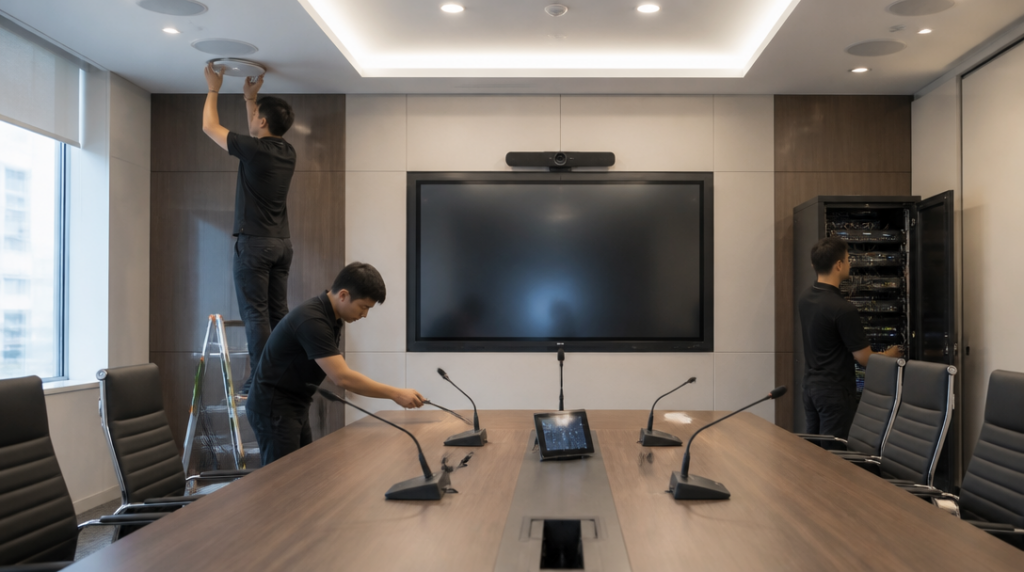
Imagine two rooms. The first is a modest meeting space with one display, a camera, speakers, microphones, a small control system, and the required cabling. The second is a training center with several screens, multiple microphones, distributed audio, room scheduling, video conferencing, centralized control, and equipment hidden in a dedicated rack. Both may be called “commercial AV installations,” but they have almost nothing in common from a budgeting perspective.
For one commercial screen, the first-year cost often lands around $900 to $1,800. That figure can include the display itself, a mounting bracket, a media player or content management system, and installation. It is a useful starting point for digital signage, reception areas, retail spaces, and smaller offices. It is not a complete estimate for a conference room, because a screen by itself does not create a usable presentation system.
The display may need signal distribution, input switching, network access, power, wall reinforcement, and control software. A conference room may also need a camera, table microphones, ceiling speakers, echo cancellation, and integration with a video meeting platform. Each addition creates another cost, but the more significant change is that the system becomes a coordinated installation rather than a collection of products.
That distinction explains why a room with a $2,000 display can still produce a five-figure project total. The screen is visible, so it attracts attention in the quote. Much of the working system sits behind the wall, under the table, in the ceiling, or inside a rack.
Labor commonly accounts for about 30% to 40% of the total AV project price. This is not simply the time required to attach a display to a wall. Installers may need to survey the room, plan cable paths, mount equipment safely, terminate and label connections, configure the control system, test microphones, tune speakers, and train staff. If the room has difficult access, unusual construction, long cable runs, or strict security requirements, the installation can take considerably more planning than the equipment list suggests.
A wall-mounted display in a finished office is a good example. The installer may need to locate structural support, check the wall type, route power and signal cables without exposing them, and position the screen so that people at the back of the room can see it comfortably. If power or network connections are not available at the mounting point, electrical and data work may become part of the project. The screen remains the most obvious object in the room, but it may be only one part of the practical challenge.
Video walls create a much wider range of prices. A small LCD video wall may cost around $12,000, while a large direct-view LED installation can reach approximately $450,000. The difference is driven by far more than screen size. The display technology, pixel pitch, viewing distance, processing hardware, mounting structure, brightness requirements, content sources, and service access all affect the design.
A 2-by-2 wall using four 55-inch LCD panels typically costs about $14,000 to $22,000. That price reflects the four professional panels, the mounting structure, signal processing, installation, configuration, and the work required to make the panels behave like one visual surface. Even a relatively small video wall demands careful alignment. A slightly uneven panel or a visible gap can distract viewers every time they look at it; I once saw a showroom display lose much of its polished appearance because one screen sat only a few millimeters out of line.
Direct-view LED systems occupy a different category. They are often selected for large spaces, high-impact presentations, control rooms, lobbies, auditoriums, and environments where a very large seamless image matters. The supporting structure and processing can be substantial, and the project may require detailed planning for heat, access, brightness, and maintenance. That is how the budget can move from a small five-figure LCD system to a six-figure LED installation.
Audio is another area where a simple estimate can become misleading. A small room might use a soundbar or compact speaker system, while a larger room may require ceiling speakers, several microphones, a digital signal processor, amplifiers, and acoustic adjustments. The number of seats matters, but so does the room’s shape and surface materials. Glass walls and hard floors can make speech less intelligible, forcing the AV design to address reflections rather than simply adding louder speakers.
Microphones also need to match the way people use the room. A presenter who stands in one place may work well with a wireless lavalier microphone. A boardroom where several people speak from a table needs a different arrangement. A training room may require microphones for both the instructor and the audience. Video conferencing adds another layer: the system must capture voices clearly enough for remote participants, not merely produce sound for people sitting inside the room.
Control requirements can push the cost upward even when the visible equipment stays the same. A basic room may switch between a laptop and a wall display with a small controller. A larger installation may allow staff to select sources, adjust lighting, operate shades, start a video call, and manage several zones from a touch panel. Centralized monitoring can show whether a device is online, whether a display is receiving a signal, or whether a room needs attention.
Multi-zone projects are expensive because they multiply both equipment and coordination. A company might want a lobby display, several meeting rooms, a divisible training space, background audio in shared areas, and a central content management system. Some zones may need to operate independently, while others must combine for a larger event. The system design has to account for those changing arrangements before installation begins. A solution that works in one room may be unsuitable when three rooms are opened into one space.
The building itself can quietly influence the quote. New construction usually makes cable routes and equipment locations easier to plan. A retrofit may involve opening walls, working above finished ceilings, using existing conduits, or coordinating with electrical and network contractors. Older buildings can present awkward distances between displays, racks, cameras, and network closets. The AV equipment may be modern, but the path connecting it may run through a building with decades of accumulated constraints.
That is why two companies requesting “the same conference room system” can receive different proposals. One room may already have suitable power, network access, structural support, and acoustic treatment. The other may need construction work before the AV installer can begin. A detailed site survey often reveals these differences before they become expensive surprises.
The purchase price is only part of the budget. For an AV room costing $40,000, ongoing monitoring, preventive maintenance, and service-level agreement support may run about $5,000 to $7,000 per year. Support can cover remote system checks, firmware and configuration management, scheduled inspections, troubleshooting, and defined response times when something fails. Those services are especially valuable in rooms used for executive meetings, customer presentations, teaching, or live events, where a failed microphone can disrupt more than a single appointment.
Without a support plan, the organization may still pay for repairs, emergency labor, replacement equipment, and staff time spent trying to identify the problem. A display that stops receiving content may have a failed player, a network issue, a loose connection, or a control-system fault. The symptom is simple; finding the cause is not always simple.
A sensible estimate should therefore separate the project into visible equipment, installation labor, infrastructure, programming, testing, training, and continuing support. Ask whether the quote includes cabling, mounting hardware, configuration, commissioning, and disposal of old equipment. Ask how the system will be supported after handover. If the proposal lists only screens, speakers, and cameras, it may describe a shopping cart rather than a functioning commercial installation.
The most reliable way to narrow the number is to describe how people will use the space. State how many participants need to speak, how many people will join remotely, what content must be displayed, whether the room will divide into smaller zones, and how quickly the system must be ready for a meeting. Those details tell an AV designer more than a request for “a large screen and good sound,” and they turn a broad price range into a project that can be measured room by room.